
Pixel Art Number Fill
Opens in a play window — no download required.
Reviews
Pixel Art Number Fill offers a genuinely relaxing experience. The lack of timers and the straightforward tap-to-fill mechanic make it easy to pick up for a few minutes or an hour. The variety of themes keeps the activity fresh, and the ability to zoom in on detailed areas is a thoughtful touch. It is a well-designed digital coloring book that delivers exactly what it promises: a peaceful way to create art by following numbers.
Description
The Core Activity
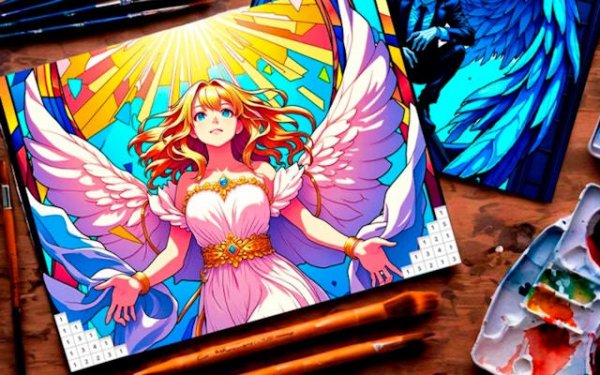
Pixel Art Number Fill presents players with a grid of small squares, each marked with a number. A color palette on the side shows which number corresponds to which shade. By selecting a color and tapping the matching numbered squares, players gradually fill in the entire grid. The process is straightforward and requires no drawing ability. The satisfaction comes from seeing a recognizable image emerge from what initially looks like random numbers.
Picture Themes and Variety
The game includes a wide selection of images organized by theme. Players can work on animals, natural scenery, geometric patterns, or reproductions of well-known paintings. Each theme offers a different visual experience, from soft landscapes to intricate mandalas. The collection grows over time with new additions, giving returning players fresh options. This variety ensures that the activity does not feel repetitive, even after many sessions.
Pacing and Difficulty Options
Images are sorted by complexity. Simpler pictures have larger segments and fewer colors, making them suitable for quick sessions or beginners. More detailed images have smaller segments and a broader palette, requiring more time and attention. There are no timers or scoring systems, so players can proceed at their preferred speed. This structure allows anyone to start with easy pieces and gradually take on more challenging compositions.
Visual and Audio Atmosphere
The interface is clean and uncluttered, with the color palette positioned for easy access. A zoom function lets players work on fine details without missing a square. The background music and sound effects are designed to be gentle and unobtrusive, supporting a calm focus. The overall presentation aims to minimize distractions and keep the attention on the coloring process.
Progress and Sharing
Unfinished pictures can be saved, allowing players to return later without losing their work. Completed artwork is stored in a personal gallery. From there, players can share their finished pieces with others through standard sharing options. This feature adds a social dimension without requiring direct interaction within the game itself.







Comments
Sign in to leave a note
You must be logged in before posting a review or rating.
No account? Create one
No comments yet. Be the first to comment!